
RRVSD Parent Portal
Welcome to the Red River Valley School Division Powerschool Parent Portal. PowerSchool is the student information system that RRVSD uses to manage information such as grades, attendance, demographics, courses, etc. Since PowerSchool is web-based, some of this information can easily and safely be shared with parents and students via an online portal.
The portal provides parents/guardians or students access to a secure and private web portal where they have the ability to view information regarding their child.
An account will be created for you, followed by an email from RRVSD SIS that will give you instructions on how to login to your account for the first time.
Getting Started
Dear Parents and Guardians,
Welcome to the new school year!
We are excited to partner with you and your child for a successful year. To help you stay connected, we use the PowerSchool Parent Portal as a central hub for important school documents and information, including the Acceptable Use Policy (AUP) and report cards.
For Parents Who Already Have An Account:
Your account is ready for the new school year! Please log in to the Parent Portal at your convenience to complete a few important steps.
Review and Agree to the AUP: You must review and agree to the Acceptable Use Policy to ensure your child has access to our school's network, computers and internet.
Access Important Documents: This is where you will find digital report cards and any other school-related documents sent home this year.
Your login details remain the same as last year. If you have forgotten your password, please use the password reset link on the login page. (Visit the Troubleshooting tab above for instructions on how to reset your password.)
For Parents Who Do Not Have an Account:
A new PowerSchool Parent Portal account has been created for you!
You will receive a separate email from RRVSD SIS after your account has been created with instructions on how to access the portal for the first time.
If you have any questions or require assistance, please contact your child's school office.
Troubleshooting
Recommended Access:
For the best experience, use the web version of PowerSchool on a computer or mobile device. The PowerSchool App is available but offers limited functionality.
If you are using a mobile device, access PowerSchool through your browser and consider bookmarking it or adding it to your home screen for easier access.
Password Reset or Username Recovery:
If you forget your username or password, click the "Forgot username or password" link. You should receive an email to help get you logged in.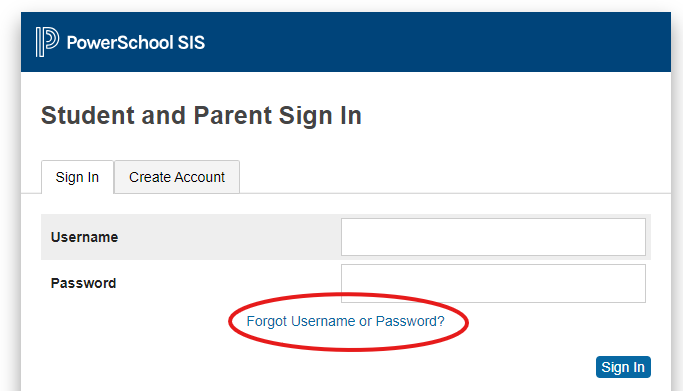
If you do not receive an email within 15-20 minutes:
- Check your junk/spam folder.
- If you still do not receive the email, contact your child's school for next steps - you will need to verify your identity.
Account Locked:
If you receive an error that your account has been locked or access is revoked, contact your school for next steps.
I am unable to connect to the Parent Portal. How do I troubleshoot?
- First, check that your internet service is working properly.
- Next, validate that you are using the correct ID, password and URL: https://rrvsd.powerschool.com/public/home.html
- Try accessing from a computer with an updated version of Chrome or Firefox.
- If you are still unable to connect, please contact your school office.
(If you received an error message, try to get a screenshot or photo of wording of the error to make it easier for the school to assist you.)
Who do I contact for technical or documentation support?
For all support questions, contact your school office.
FAQ
What is PowerSchool?
Powerschool is the student information system that RRVSD uses to manage information such as grades, attendance, demographics, courses, etc. Since PowerSchool is web-based, some of this information can easily and safely be shared with parents and student via an online portal.
Can I access the Parent Portal from anywhere?
Yes. You can access the Parent Portal from any computer with an internet connection.
Why is the PowerSchool App different than the RRVSD Parent Portal website?
The PowerSchool Parent Portal App has limited functionality, and does not allow for feature customization. To ensure the best possible user experience, we strongly recommend that mobile users access the RRVSD Parent Portal through the login on this web page and avoid using the PowerSchool managed App.
I have children in more than one Red River Valley School Division school, will they be visible in the Portal?
Yes! Any child you have attending RRVSD will appear in the Portal as long as you have provided the same email address for each child.
Will my child's information be secure?
Yes. Your child's records can only be accessed by authorized school officials and those with whom you share your password. As long as you protect your password, others will not be able to see your child's information. To protect/monitor against unauthorized access, the system will also display a log of registered users who have access to your child's information.
My spouse and I are separated/divorced, can we create separate accounts for the same children?
Yes, as long as each parent/guardian has a unique email address, additional Parent Access Accounts are permitted.
I am a foster parent. Will RRVSD provide me with Parent Portal access to CFS children in my care?
Although RRVSD values the care and commitment many of our foster families give to children who are in the care of Child and Family Services, Parent Portal information can only be released to CFS guardians.
Therefore, for all children in the care of CFS, the Access ID's will only be sent to each child's legal guardian (their assigned CFS worker). Agencies/workers will determine with whom to share this student information, as per their professional judgment and legislated authority. If the agency (worker) agress to give access, a Parent Portal account will be set up for you.
If you have questions or concerns regarding foster parent access, please contact Darren Skog, Assistant Superintendent, at dskog@rrvsd.ca
Portal Shortcut
Did you know you can make the PowerSchool Parent Portal website look and function just like a mobile app on your smartphone?
For the fastest way to check grades, attendance, and report cards, turn the PowerSchool Parent Portal into a convenient shortcut on your phone’s home screen. See the easy setup guides for iPhone and Android below!